Warmups come from your program, your own default per exercise, or the built-in scheme. Change them per week, give each set its own rest, or turn them off.
Warmups in a workout
Warmup sets come before the working sets of an exercise. Each one has a W instead of a set number, and the word Warmup over its reps and weight. Complete a warmup with the checkmark, like any set. It turns green.
Completing a warmup starts the rest timer. The set's own rest time comes first. Otherwise the timer uses Warmup under Me → Timers, 90 seconds by default.
Add Warmup Set under the sets adds one more. The first one starts at the empty bar. The next ones copy the last warmup.
Warmups do not count toward volume, reps or sets per muscle group. The CSV export includes them, marked in the Is Warmup Set? column.
Where warmups come from
The app picks the warmups for an exercise in this order:
The warmup: of the exercise in your program.
Your own default for the exercise, from its stats screen.
The built-in scheme.
warmup: none in the program, or No warmups as the default, means no warmups at all.
The built-in scheme
Every built-in row is 1 set of 5 reps, at 30%, 50% and 80% of the first working set. A row is left out when the first working set is light. The limit depends on the exercise:
Most exercises skip 30% at 60 lb or less, 50% at 30 lb or less, and 80% at 10 lb or less. In kg: 30, 15 and 5.
Most barbell lifts, like the squat, bench press and overhead press, skip 30% at 120 lb, 50% at 90 lb and 80% at 45 lb. In kg: 60, 45 and 20.
Deadlifts and the bent-over row skip 30% at 150 lb, 50% at 125 lb and 80% at 95 lb. In kg: 70, 60 and 40.
Custom exercises use the barbell limits. A bodyweight exercise with 0 lb gets no warmups, because every row is under its limit.
Change the default for one exercise
Go to Me → Exercises and tap an exercise, or tap the exercise name in a workout. The Exercise Stats screen has a Default Warmups section. It shows the built-in rows, like "5 × 30%" with "skip if first set ≤ 60lb".
Customize copies the built-in rows into a table you can edit.
No warmups turns warmups off for this exercise.
Use built-in goes back to the built-in scheme.
The table has Reps, Weight, Rest, s and Skip if ≤ columns. Weight is in lb, kg, or % of the first working set. Skip if ≤ leaves the row out when the first working set is that weight or lighter. Swipe a row left and tap Delete to remove it. Add Warmup Set adds a row.
The default is saved per exercise and equipment. So a barbell squat and a Smith machine squat can have different warmups. A program with a warmup: for the exercise ignores the default.
A percentage over 100% stays heavier than the working weight. 1x1 120% before 225 lb is 270 lb. On an assisted exercise with a negative weight, a percentage over 100% means more assistance.
Different warmups in different weeks
A warmup: applies to later weeks on the same day, until the next warmup: changes it. So a deload week can turn warmups off, and the next week brings them back:
Weeks before the first warmup: use it too. If Week 1 has no warmup: and Week 3 has warmup: none, Week 1 gets no warmups either. An exercise that reuses another with ...Squat takes its warmups only when it has no warmup: in any week.
Change warmups with a script
An update: script can change the warmups of the current workout with warmupWeights, warmupReps, warmupTimers and numberOfWarmupSets. This one adds a 90% warmup, and drops all warmups in week 4:
A percentage written to warmupWeights is a percentage of the 1RM. Completed warmups never change. progress: scripts can read the warmup variables but not change them. Dashboards can read warmupWeights, warmupReps and the completed warmups.
{"feature":{"id":"warmups","title":"Warmup Sets","shortDescription":"Warmups come from your program, your own default per exercise, or the built-in scheme. Change them per week, give each set its own rest, or turn them off.","order":35,"category":"Workout","datePublished":"2026-11-27","dateModified":"2026-11-27","screenshots":["warmups-workout","warmups-defaults"]},"content":"## Warmups in a workout\n\n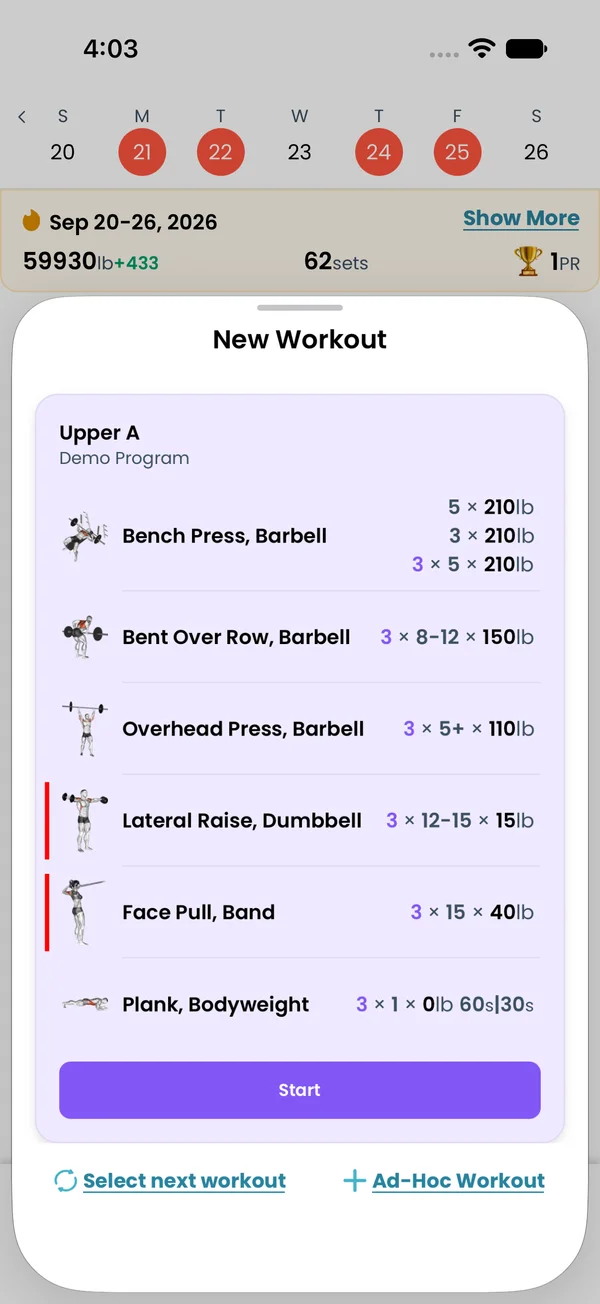\n\nWarmup sets come before the working sets of an exercise. Each one has a **W** instead of a set number, and the word **Warmup** over its reps and weight. Complete a warmup with the checkmark, like any set. It turns green.\n\nCompleting a warmup starts the [rest timer](/features/rest-timer). The set's own rest time comes first. Otherwise the timer uses **Warmup** under **Me → Timers**, 90 seconds by default.\n\n**Add Warmup Set** under the sets adds one more. The first one starts at the empty bar. The next ones copy the last warmup.\n\nWarmups do not count toward volume, reps or sets per muscle group. The CSV export includes them, marked in the **Is Warmup Set?** column.\n\n## Where warmups come from\n\nThe app picks the warmups for an exercise in this order:\n\n1. The `warmup:` of the exercise in your program.\n2. Your own default for the exercise, from its stats screen.\n3. The built-in scheme.\n\n`warmup: none` in the program, or **No warmups** as the default, means no warmups at all.\n\n## The built-in scheme\n\nEvery built-in row is 1 set of 5 reps, at 30%, 50% and 80% of the first working set. A row is left out when the first working set is light. The limit depends on the exercise:\n\n- Most exercises skip 30% at 60 lb or less, 50% at 30 lb or less, and 80% at 10 lb or less. In kg: 30, 15 and 5.\n- Most barbell lifts, like the squat, bench press and overhead press, skip 30% at 120 lb, 50% at 90 lb and 80% at 45 lb. In kg: 60, 45 and 20.\n- Deadlifts and the bent-over row skip 30% at 150 lb, 50% at 125 lb and 80% at 95 lb. In kg: 70, 60 and 40.\n\nCustom exercises use the barbell limits. A bodyweight exercise with 0 lb gets no warmups, because every row is under its limit.\n\n## Change the default for one exercise\n\n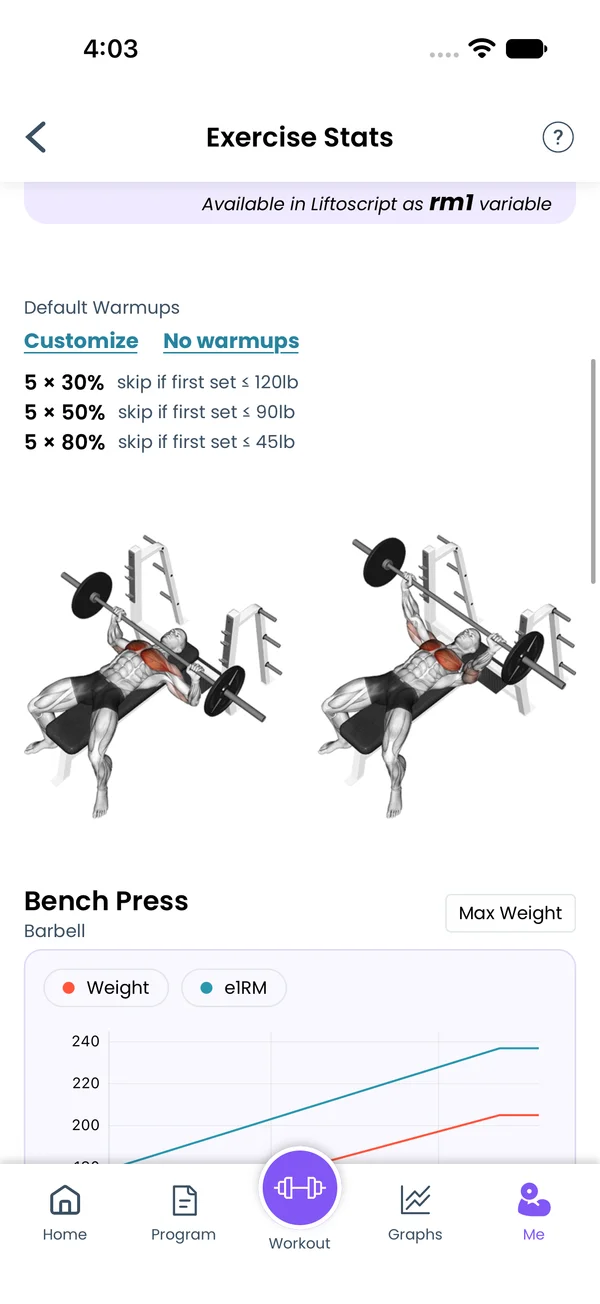 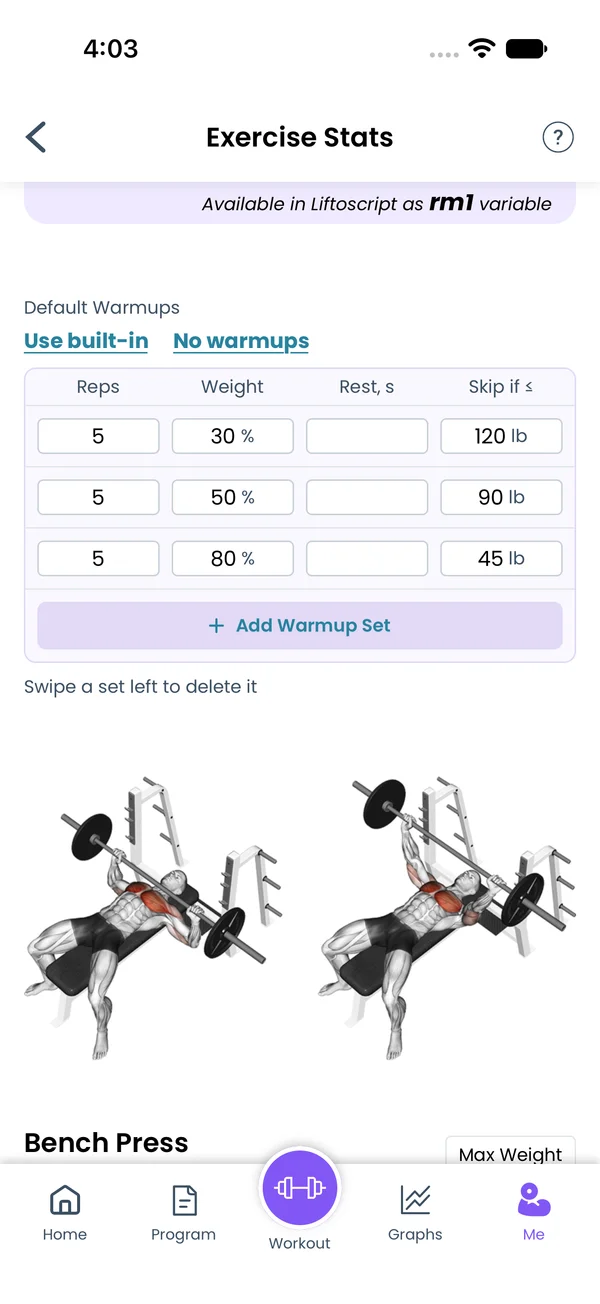\n\nGo to **Me → Exercises** and tap an exercise, or tap the exercise name in a workout. The **Exercise Stats** screen has a **Default Warmups** section. It shows the built-in rows, like \"5 × 30%\" with \"skip if first set ≤ 60lb\".\n\n- **Customize** copies the built-in rows into a table you can edit.\n- **No warmups** turns warmups off for this exercise.\n- **Use built-in** goes back to the built-in scheme.\n\nThe table has **Reps**, **Weight**, **Rest, s** and **Skip if ≤** columns. Weight is in lb, kg, or % of the first working set. **Skip if ≤** leaves the row out when the first working set is that weight or lighter. Swipe a row left and tap **Delete** to remove it. **Add Warmup Set** adds a row.\n\nThe default is saved per exercise and equipment. So a barbell squat and a Smith machine squat can have different warmups. A program with a `warmup:` for the exercise ignores the default.\n\n## Write warmups in the program\n\nAdd `warmup:` to an exercise line in [Liftoscript](/features/liftoscript):\n\n```liftoscript\nSquat / 5x5 / 225lb / warmup: 1x5 45lb, 1x5 135lb, 1x3 80%\n```\n\nA percentage is of the first working set, not of your 1RM. `0%` is the empty bar. Program warmups have no skip limits.\n\nAdd a rest time after the weight to give a warmup set its own rest:\n\n```liftoscript\nSquat / 5x5 / 225lb / warmup: 1x5 50% 30s, 1x3 80% 90s\n```\n\nA percentage over 100% stays heavier than the working weight. `1x1 120%` before 225 lb is 270 lb. On an assisted exercise with a negative weight, a percentage over 100% means more assistance.\n\n## Different warmups in different weeks\n\nA `warmup:` applies to later weeks on the same day, until the next `warmup:` changes it. So a deload week can turn warmups off, and the next week brings them back:\n\n```liftoscript\n# Week 1\n## Day 1\nSquat / 3x5 / 200lb / warmup: 1x5 45lb, 1x3 135lb\n\n# Week 4\n## Day 1\nSquat / 3x5 / 150lb / warmup: none\n\n# Week 5\n## Day 1\nSquat / 3x5 / 210lb / warmup: 1x5 45lb, 1x3 135lb\n```\n\nWeeks before the first `warmup:` use it too. If Week 1 has no `warmup:` and Week 3 has `warmup: none`, Week 1 gets no warmups either. An exercise that reuses another with `...Squat` takes its warmups only when it has no `warmup:` in any week.\n\n## Change warmups with a script\n\nAn `update:` script can change the warmups of the current workout with `warmupWeights`, `warmupReps`, `warmupTimers` and `numberOfWarmupSets`. This one adds a 90% warmup, and drops all warmups in week 4:\n\n```liftoscript\nSquat / 3x5 / 225lb / update: custom() {~\n if (setIndex == 0) {\n warmupWeights[numberOfWarmupSets] = 90%\n if (week == 4) {\n numberOfWarmupSets = 0\n }\n }\n~}\n```\n\nA percentage written to `warmupWeights` is a percentage of the 1RM. Completed warmups never change. `progress:` scripts can read the warmup variables but not change them. [Dashboards](/features/graphs) can read `warmupWeights`, `warmupReps` and the completed warmups.\n\n## Fewer plate changes in warmups\n\nYour [equipment](/features/equipment-and-gyms) can make warmups easier to load:\n\n- For plates, **Use fewer plates for warmups** adds a **Warmups use only** card. Warmups then load only the plate sizes you switch on there.\n- For a weight stack with add-ons, **Skip add-ons in warmups** makes warmups use the stack only.\n\nWhen those plates cannot make a warmup weight, the app uses all your plates for it.","sizes":{"account/account-email-form":{"width":600,"height":1304},"account/account-forgot-password":{"width":600,"height":1304},"account/account-screen":{"width":600,"height":1304},"account/account-sign-in":{"width":600,"height":1304},"api/api-key-created":{"width":600,"height":1304},"api/api-keys-empty":{"width":600,"height":1304},"api/api-me-row":{"width":600,"height":1304},"apple-watch/apple-watch-health-settings":{"width":600,"height":1304},"apple-watch/watch-apple-watch-amrap":{"width":416,"height":496},"apple-watch/watch-apple-watch-crown":{"width":416,"height":496},"apple-watch/watch-apple-watch-exercise":{"width":416,"height":496},"apple-watch/watch-apple-watch-get-ready":{"width":416,"height":496},"apple-watch/watch-apple-watch-home":{"width":416,"height":496},"apple-watch/watch-apple-watch-set-clock":{"width":416,"height":496},"apple-watch/watch-apple-watch-workout":{"width":416,"height":496},"built-in-programs/built-in-programs-import":{"width":600,"height":1304},"built-in-programs/built-in-programs-info":{"width":600,"height":1304},"built-in-programs/built-in-programs-library":{"width":600,"height":1304},"built-in-programs/built-in-programs-preview":{"width":600,"height":1304},"built-in-programs/built-in-programs-started":{"width":600,"height":1304},"changing-a-workout/changing-a-workout-adhoc":{"width":600,"height":1304},"changing-a-workout/changing-a-workout-adhoc-picker":{"width":600,"height":1304},"changing-a-workout/changing-a-workout-create-program-day":{"width":600,"height":1304},"changing-a-workout/changing-a-workout-edit-day":{"width":600,"height":1304},"changing-a-workout/changing-a-workout-edit-exercise":{"width":600,"height":1304},"changing-a-workout/changing-a-workout-next-workout":{"width":600,"height":1304},"changing-a-workout/changing-a-workout-pick-day":{"width":600,"height":1304},"changing-a-workout/changing-a-workout-program-day":{"width":600,"height":1304},"changing-a-workout/changing-a-workout-swap-adhoc":{"width":600,"height":1304},"changing-a-workout/changing-a-workout-swap-from-program":{"width":600,"height":1304},"changing-a-workout/changing-a-workout-swap-recent":{"width":600,"height":1304},"chatgpt-claude-and-ai/chatgpt-claude-and-ai-autofill":{"width":600,"height":1304},"custom-exercises/custom-exercises-autofill":{"width":600,"height":1304},"custom-exercises/custom-exercises-clone-library":{"width":600,"height":1304},"custom-exercises/custom-exercises-cloned":{"width":600,"height":1304},"custom-exercises/custom-exercises-form":{"width":600,"height":1304},"custom-exercises/custom-exercises-hidden-group":{"width":600,"height":1304},"custom-exercises/custom-exercises-image-library":{"width":600,"height":1304},"custom-exercises/custom-exercises-image-source":{"width":600,"height":1304},"custom-exercises/custom-exercises-in-workout":{"width":600,"height":1304},"custom-exercises/custom-exercises-muscle-groups":{"width":600,"height":1304},"custom-exercises/custom-exercises-picker":{"width":600,"height":1304},"custom-exercises/custom-exercises-target-muscles":{"width":600,"height":1304},"equipment-and-gyms/equipment-and-gyms-barbell":{"width":600,"height":1304},"equipment-and-gyms/equipment-and-gyms-custom":{"width":600,"height":1304},"equipment-and-gyms/equipment-and-gyms-custom-detail":{"width":600,"height":1304},"equipment-and-gyms/equipment-and-gyms-exercise":{"width":600,"height":1304},"equipment-and-gyms/equipment-and-gyms-fixed":{"width":600,"height":1304},"equipment-and-gyms/equipment-and-gyms-gyms":{"width":600,"height":1304},"equipment-and-gyms/equipment-and-gyms-hidden":{"width":600,"height":1304},"equipment-and-gyms/equipment-and-gyms-list":{"width":600,"height":1304},"exercise-library/exercise-library-calculator":{"width":600,"height":1304},"exercise-library/exercise-library-from-program":{"width":600,"height":1304},"exercise-library/exercise-library-list":{"width":600,"height":1304},"exercise-library/exercise-library-multi-add":{"width":600,"height":1304},"exercise-library/exercise-library-override-muscles":{"width":600,"height":1304},"exercise-library/exercise-library-picker":{"width":600,"height":1304},"exercise-library/exercise-library-prs":{"width":600,"height":1304},"exercise-library/exercise-library-search":{"width":600,"height":1304},"exercise-library/exercise-library-stats":{"width":600,"height":1304},"exercise-library/exercise-library-swap":{"width":600,"height":1304},"first-run-and-settings/first-run-and-settings-appearance":{"width":600,"height":1304},"first-run-and-settings/first-run-and-settings-dark-mode":{"width":600,"height":1304},"first-run-and-settings/first-run-and-settings-equipment":{"width":600,"height":1304},"first-run-and-settings/first-run-and-settings-me":{"width":600,"height":1304},"first-run-and-settings/first-run-and-settings-units":{"width":600,"height":1304},"first-run-and-settings/first-run-and-settings-welcome":{"width":600,"height":1304},"friends/friends-feed":{"width":600,"height":1304},"friends/friends-feed-filter":{"width":600,"height":1304},"friends/friends-invite":{"width":600,"height":1304},"friends/friends-list":{"width":600,"height":1304},"friends/friends-nickname":{"width":600,"height":1304},"friends/friends-notifications":{"width":600,"height":1304},"friends/friends-profile":{"width":600,"height":1304},"friends/friends-reactions":{"width":600,"height":1304},"friends/friends-request":{"width":600,"height":1304},"graphs/graphs-cursor":{"width":600,"height":1299},"graphs/graphs-dashboard":{"width":600,"height":1299},"graphs/graphs-dashboards":{"width":600,"height":1299},"graphs/graphs-edit":{"width":600,"height":1299},"graphs/graphs-personal-records":{"width":600,"height":1299},"graphs/graphs-series":{"width":600,"height":1299},"graphs/graphs-text":{"width":600,"height":1299},"graphs/graphs-tile-menu":{"width":600,"height":1299},"graphs/graphs-widget":{"width":600,"height":1299},"health-sync/android-health-sync-measurements":{"width":600,"height":1339},"health-sync/android-health-sync-settings":{"width":600,"height":1339},"health-sync/android-health-sync-share":{"width":600,"height":1339},"health-sync/android-health-sync-sleep-nutrition":{"width":600,"height":1339},"health-sync/health-sync-measurements":{"width":600,"height":1304},"health-sync/health-sync-settings":{"width":600,"height":1304},"health-sync/health-sync-share":{"width":600,"height":1304},"health-sync/health-sync-sleep-nutrition":{"width":600,"height":1304},"import-export/import-export-export":{"width":600,"height":1304},"import-export/import-export-hevy":{"width":600,"height":1304},"import-export/import-export-import":{"width":600,"height":1304},"liftoscript/liftoscript-exercise-sheet":{"width":600,"height":1304},"liftoscript/liftoscript-full-program":{"width":600,"height":1304},"liftoscript/liftoscript-per-day":{"width":600,"height":1304},"liftoscript/liftoscript-playground":{"width":600,"height":1304},"lock-screen-and-notifications/android-lock-screen-and-notifications-live-update":{"width":600,"height":1339},"lock-screen-and-notifications/android-lock-screen-and-notifications-reminder":{"width":600,"height":1339},"lock-screen-and-notifications/android-lock-screen-and-notifications-sound":{"width":600,"height":1339},"lock-screen-and-notifications/lock-screen-and-notifications-dynamic-island":{"width":600,"height":1304},"lock-screen-and-notifications/lock-screen-and-notifications-live-activity":{"width":600,"height":1304},"lock-screen-and-notifications/lock-screen-and-notifications-reminder":{"width":600,"height":1304},"lock-screen-and-notifications/lock-screen-and-notifications-sound":{"width":600,"height":1304},"measurements/measurements-add":{"width":600,"height":1304},"measurements/measurements-bodyweight":{"width":600,"height":1304},"measurements/measurements-moving-average":{"width":600,"height":1304},"measurements/measurements-sleep-nutrition":{"width":600,"height":1304},"measurements/measurements-types":{"width":600,"height":1304},"playground/playground-completed":{"width":600,"height":1304},"playground/playground-day":{"width":600,"height":1304},"playground/playground-finished":{"width":600,"height":1304},"playground/playground-variables":{"width":600,"height":1304},"premium/premium-account":{"width":600,"height":1304},"premium/premium-feature-info":{"width":600,"height":1304},"premium/premium-plans":{"width":600,"height":1304},"program-editor/program-editor-create":{"width":600,"height":1304},"program-editor/program-editor-day-details":{"width":600,"height":1304},"program-editor/program-editor-exercise-sheet":{"width":600,"height":1304},"program-editor/program-editor-full-text":{"width":600,"height":1304},"program-editor/program-editor-grid":{"width":600,"height":1304},"program-editor/program-editor-perday-text":{"width":600,"height":1304},"program-editor/program-editor-ui-mode":{"width":600,"height":1304},"program-editor/program-editor-week-stats":{"width":600,"height":1304},"progressions/progressions-linear-settings":{"width":600,"height":1304},"progressions/progressions-preview":{"width":600,"height":1304},"progressions/progressions-state-variables":{"width":600,"height":1304},"progressions/progressions-suppressed":{"width":600,"height":1304},"rest-timer/rest-timer-collapsed":{"width":600,"height":1304},"rest-timer/rest-timer-dynamic-island":{"width":600,"height":1304},"rest-timer/rest-timer-expanded":{"width":600,"height":1304},"rest-timer/rest-timer-get-ready":{"width":600,"height":1304},"rest-timer/rest-timer-lock-screen":{"width":600,"height":1304},"rest-timer/rest-timer-settings":{"width":600,"height":1304},"rest-timer/rest-timer-sound":{"width":600,"height":1304},"rest-timer/watch-rest-timer":{"width":416,"height":496},"rest-timer/watch-rest-timer-exercise":{"width":416,"height":496},"set-types/set-types-amrap-popup":{"width":600,"height":1304},"set-types/set-types-per-side":{"width":600,"height":1304},"set-types/set-types-rpe-logged":{"width":600,"height":1304},"set-types/set-types-rpe-popup":{"width":600,"height":1304},"sharing-programs/sharing-programs-export-text":{"width":600,"height":1304},"sharing-programs/sharing-programs-image-preview":{"width":600,"height":1304},"sharing-programs/sharing-programs-image-settings":{"width":600,"height":1304},"sharing-programs/sharing-programs-import":{"width":600,"height":1304},"sharing-programs/sharing-programs-menu":{"width":600,"height":1304},"sharing-programs/sharing-programs-private-link":{"width":600,"height":1304},"sharing-programs/sharing-programs-public-link":{"width":600,"height":1304},"sharing-workouts/sharing-workouts-copied-text":{"width":600,"height":1304},"sharing-workouts/sharing-workouts-finish-screen":{"width":600,"height":1304},"sharing-workouts/sharing-workouts-profile-settings":{"width":600,"height":1304},"sharing-workouts/sharing-workouts-share-sheet":{"width":600,"height":1304},"sharing-workouts/sharing-workouts-story-preview":{"width":600,"height":1304},"supersets/supersets-liftoscript":{"width":600,"height":1304},"supersets/supersets-next-exercise":{"width":600,"height":1304},"supersets/supersets-picker":{"width":600,"height":1304},"supersets/supersets-program-editor":{"width":600,"height":1304},"supersets/supersets-timer":{"width":600,"height":1304},"supersets/supersets-workout":{"width":600,"height":1304},"sync-and-offline/sync-and-offline-account":{"width":600,"height":1304},"sync-and-offline/sync-and-offline-me-account":{"width":600,"height":1304},"sync-and-offline/sync-and-offline-sign-in":{"width":600,"height":1304},"timed-sets/timed-sets-count-up":{"width":600,"height":1304},"timed-sets/timed-sets-edit-time":{"width":600,"height":1304},"timed-sets/timed-sets-get-ready":{"width":600,"height":1304},"timed-sets/timed-sets-recorded":{"width":600,"height":1304},"timed-sets/timed-sets-running":{"width":600,"height":1304},"timed-sets/timed-sets-set-row":{"width":600,"height":1304},"timed-sets/timed-sets-timers":{"width":600,"height":1304},"warmups/warmups-custom":{"width":600,"height":1304},"warmups/warmups-defaults":{"width":600,"height":1304},"warmups/warmups-workout":{"width":600,"height":1304},"week-insights/week-insights-details":{"width":600,"height":1304},"week-insights/week-insights-edit-muscle-groups":{"width":600,"height":1304},"week-insights/week-insights-exercises":{"width":600,"height":1304},"week-insights/week-insights-home":{"width":600,"height":1304},"week-insights/week-insights-muscle-groups":{"width":600,"height":1304},"week-insights/week-insights-settings":{"width":600,"height":1304},"workout-history/workout-history-change-date":{"width":600,"height":1304},"workout-history/workout-history-delete":{"width":600,"height":1304},"workout-history/workout-history-feed":{"width":600,"height":1304},"workout-history/workout-history-menu":{"width":600,"height":1304},"workout-history/workout-history-month-calendar":{"width":600,"height":1304},"workout-history/workout-history-note-on-card":{"width":600,"height":1304},"workout-history/workout-history-notes":{"width":600,"height":1304},"workout-history/workout-history-past-card":{"width":600,"height":1304},"workout-history/workout-history-past-workout":{"width":600,"height":1304},"workout-history/workout-history-week-insights":{"width":600,"height":1304},"workout-screen/workout-screen-e1rm":{"width":600,"height":1304},"workout-screen/workout-screen-edit-target":{"width":600,"height":1304},"workout-screen/workout-screen-exercise-menu":{"width":600,"height":1304},"workout-screen/workout-screen-exercise-notes":{"width":600,"height":1304},"workout-screen/workout-screen-history":{"width":600,"height":1304},"workout-screen/workout-screen-keypad":{"width":600,"height":1304},"workout-screen/workout-screen-next-set":{"width":600,"height":1304},"workout-screen/workout-screen-overview":{"width":600,"height":1304},"workout-screen/workout-screen-rounding":{"width":600,"height":1304},"workout-screen/workout-screen-summary":{"width":600,"height":1304},"workout-screen/workout-screen-update-program":{"width":600,"height":1304}}}


